Minesweeper Number Colors Explained
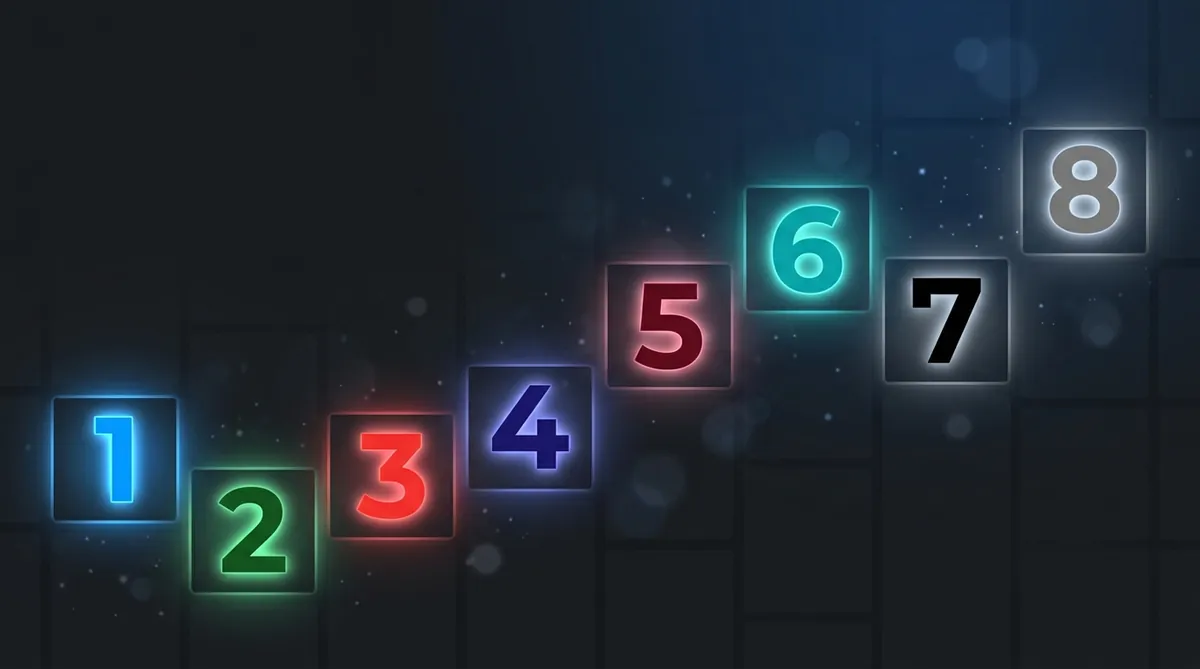
The number colors in classic Minesweeper are a speed tool, not decoration. 1 is blue, 2 is green, 3 is red, 4 is dark blue and 5 is dark red or maroon. Because the scheme never changes, your eye learns to tell numbers apart at a glance without stopping to read each digit.
If you've ever stared at a Minesweeper board and felt confused by all those colorful numbers, you're not alone. But those colors aren't just for decoration. They're one of the most useful tools in the whole game. Once you understand what each color means, you'll start reading the board way faster.
The Classic Color Scheme, Explained
In the original Windows Minesweeper, every number has its own color. The game uses this system so your eyes can tell numbers apart at a glance, without having to actually read each digit. It sounds small, but it makes a huge difference when you're playing fast.
Here's the full color breakdown:
You can dig deeper into what each value actually tells you about the board in this number chart article.
Why Colors Actually Matter
So why does the color even matter if you can just read the number? Great question. The answer is speed.
When you're playing casually, reading each number is fine. But when you start trying to improve your time, your brain needs shortcuts. And colors are exactly that. Instead of reading "3", your eyes just see red and instantly know there are three mines nearby. It's like learning to recognize a stop sign by its shape, not by reading the word "STOP".
Blue is the most common color you'll see on the board. That's because 1s show up all the time, especially near the edges of cleared areas. And blue is bright and easy to spot. Green for 2s is also really common. Those two colors together basically tell you "this area is probably safe to work with".
Red 3s are your first warning signal. When you see a cluster of red, slow down and pay attention. And if you ever spot maroon 5s, teal 6s, or black 7s, that's a serious danger zone. Those high numbers mean mines are packed in tight. Check out number 8 to see what it looks like when all eight neighbors are mines.
Using Color as a Speed Strategy
Here's a real trick that faster players use: scan by color first, then think. When you open a new area, your eyes should sweep the board looking for any red or dark numbers before you make your next move. If you only see blues and greens, you can usually move quickly. If red pops up, that's your cue to slow down and think.
This works especially well when you're doing pattern recognition. Common patterns like 1-2-1 or 1-2-2-1 become even easier to spot when you're reading them as color sequences, like blue-green-blue or blue-green-green-blue.
Wait, Different Versions Use Different Colors?
Yep. The classic Windows XP color scheme is the most famous one, but not every version follows it exactly. Some browser games, mobile apps, and modern remakes use custom themes. You might see a dark mode where the colors are brighter and more neon. Or a high-contrast mode where everything looks different.
But most serious Minesweeper games keep the same basic logic, even if the shades change a little. If you're playing somewhere new and the colors look off, check the settings. A lot of games let you pick your theme. The gameplay guide can help you get oriented on any new platform.
And if you want to really understand why numbers appear where they do, the number logic article breaks down the math behind adjacency in a way that's easy to follow.
Get Comfortable With the Colors
Look, the color system in Minesweeper isn't complicated once you know it. It's just a visual shortcut the game gives you. Blue is chill, green is okay, red is a warning, and the dark colors mean trouble. Once those associations click, you'll feel way more confident on the board.
The best way to lock it in is practice. Jump into a game right now, play minesweeper a few rounds, and really pay attention to the colors as you go. You'll be surprised how fast it starts to feel natural.
Try what you just read: Beginner Minesweeper · Intermediate Minesweeper · Expert Minesweeper · No-Guessing mode · Daily Challenge. For technique deep-dives, see the patterns guide, efficiency & 3BV/s guide and Minesweeper FAQ.
Run the numbers with the Minesweeper 3BV calculator, see how good your time is, or read more in the Minesweeper guides.